
Receipt scanner software
Receipt Scanner Software
Transform how your business handles receipts with Doxbox's powerful receipt scanner software. Our OCR receipt scanner captures, extracts, and organizes expense data in seconds—eliminating manual data entry, simplifying tax preparation, and giving you complete control over expense management. Whether you're tracking business expenses, preparing for audits, or streamlining reimbursements, Doxbox is the best receipt scanner software for businesses of any size
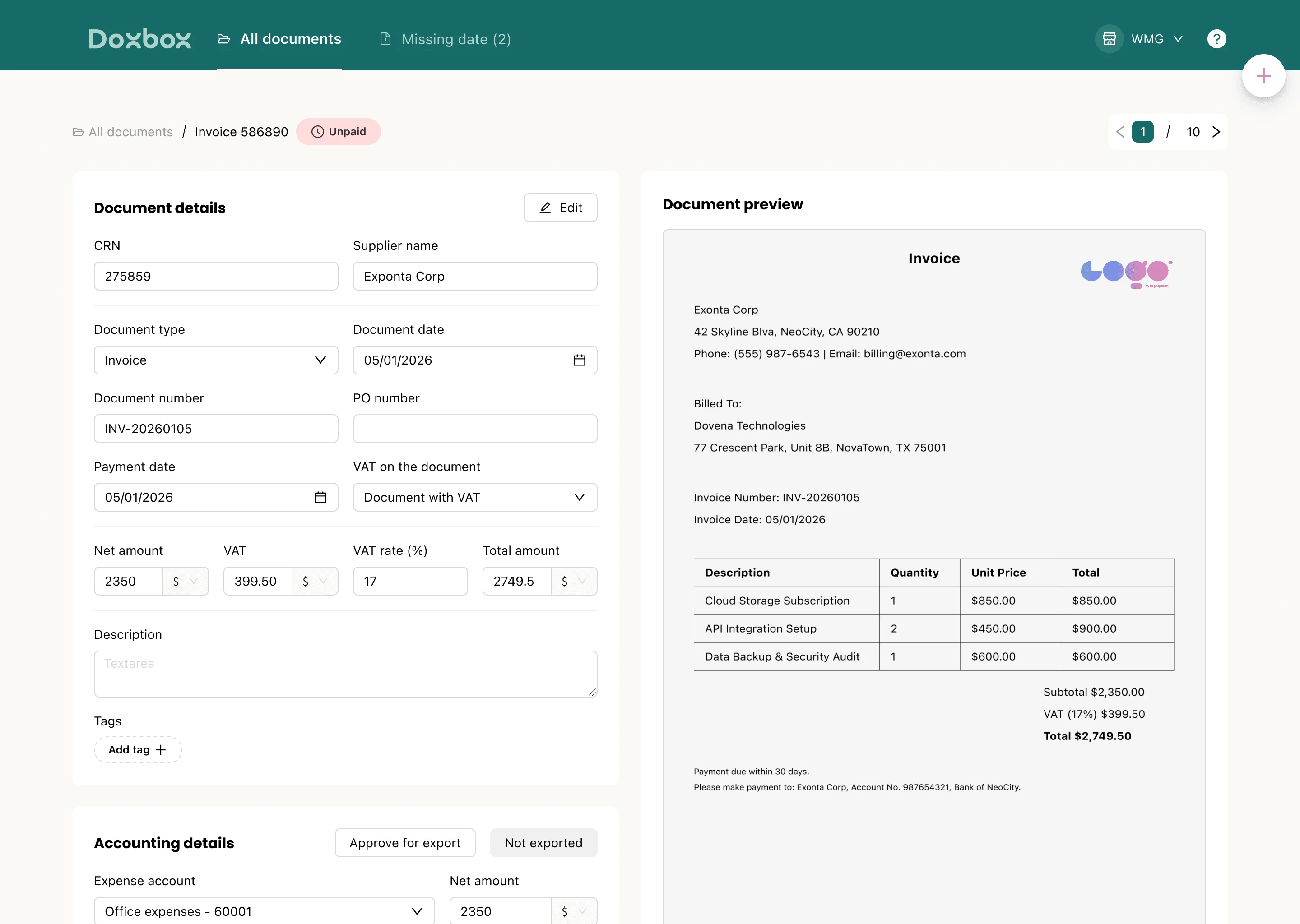
Quick exporte
Auto-categorized
Multi currency
Searche PDF

Quick exporte
Auto-categorized
Multi currency
Searche PDF

Quick exporte
Auto-categorized
Multi currency
Searche PDF
Scan expense receipts in seconds
with OCR technology
Scan expense receipts in seconds
with OCR technology
Scan expense receipts in seconds with OCR technology
Doxbox's advanced OCR data extraction technology turns any receipt into structured, actionable data instantly. Our AI-powered engine reads paper receipts, digital receipts, and e-receipts with exceptional accuracy—capturing line items, amounts, dates, tax details, and currencies automatically
Instant receipt scanning from mobile devices, desktop uploads, or email forwarding
Cloud-based receipt management accessible from anywhere, on any device
Real-time processing with automatic data extraction and validation
Multi-format receipt handling: physical receipts, PDFs, images, and email receipts
Why businesses rely on receipt scanner software
Manual receipt management is time-consuming, error-prone, and creates compliance risks. Doxbox's receipt scanner software eliminates these challenges, giving finance teams the tools they need to work smarter
Save time: Reduce manual data entry by up to 70% with automatic data extraction
Reduce errors: AI-powered OCR delivers accuracy improvement over manual entry
Track expenses effortlessly: Auto-categorize expenses and identify tax deductions automatically
Stay audit-ready: IRS-accepted digital receipt storage with complete audit trails
Scale with confidence: From small business receipt scanner needs to enterprise-level volume
How our receipt scanner software works
Doxbox makes receipt management effortless with a simple three-step process that takes you from paper chaos to organized digital records
Step 1: Capture your receipts
Capture receipts however works best for you. Snap photos with your mobile device, upload PDFs from your desktop, connect your email or WhatsApp to integrate for automated capture. Our system handles physical receipts, e-receipts, and digital invoices with equal ease.
Step 2: Extract & validate data
Our AI-powered OCR engine instantly extracts all relevant data: line items, amounts, dates, tax details, currencies, and vendor information. Receipts are automatically categorized based on your rules. For critical expenses, you can use human verification ensures every detail is correct
Step 3: Generate reports & integrate
Doxbox automatically creates expense reports ready for submission or reimbursement. Export data directly to your accounting software, ERP system, or spreadsheets. All receipts are stored in IRS-accepted digital format ensuring you're always prepared
Step 1: Capture your receipts
Capture receipts however works best for you. Snap photos with your mobile device, upload PDFs from your desktop, connect your email or WhatsApp to integrate for automated capture. Our system handles physical receipts, e-receipts, and digital invoices with equal ease.
Step 2: Extract & validate data
Our AI-powered OCR engine instantly extracts all relevant data: line items, amounts, dates, tax details, currencies, and vendor information. Receipts are automatically categorized based on your rules. For critical expenses, you can use human verification ensures every detail is correct
Step 3: Generate reports & integrate
Doxbox automatically creates expense reports ready for submission or reimbursement. Export data directly to your accounting software, ERP system, or spreadsheets. All receipts are stored in IRS-accepted digital format ensuring you're always prepared
Features that make our receipt scanner software stand out
Auto-categorized expenses
Auto-categorized
expenses
Receipts are automatically categorized and organized in one smart dashboard
multi-currency capture
Detailed line-item data with accurate multi-currency
support
Accounting Sync – Coming Soon
Sync seamlessly with your accounting and financial
tools
Mobile & desktop access
Mobile & desktop
access
Capture receipts anywhere, manage everything in one place
Workflow automation - coming soon!!
Automated approvals, reimbursements, and team workflows
Benefits of using our
receipt scanner software
Benefits of using our
receipt scanner software
Benefits of using our
receipt scanner software
Reduce manual data entry by up to 70%
Minimize errors and improve financial accuracy across your organization
Save time and costs
Save time and costs
Save time and costs
Automated workflows and instant processing free your team for higher-value work
Simplify tax preparation
Automatic deduction tracking and IRS-ready digital storage
Enhance team productivity
Centralized expense management with scalable processing for any volume
How to get started with our
receipt scanner software
Step 1: Sign up and setup
Getting started is fast and easy. Register your account, complete minimal configuration, and you're ready to go. Doxbox works across all your devices desktop and mobile app
Step 2: Import & scan receipts
Choose how you want to capture receipts: drag-and-drop uploads, email forwarding, mobile camera capture, or WhatsApp. Every method delivers the same accurate results
Step 3: Automate, categorize, export
Let Doxbox's AI-powered extraction and auto-categorization organize your expenses automatically. watch data flow seamlessly into your systems
Why choose our receipt scanner Software
Doxbox is trusted by thousands of businesses for reliable, accurate receipt scanning and expense management. Our AI-powered OCR delivers industry-leading accuracy, while enterprise-grade security keeps your financial data protected. DoxBox provides the most robust Expense Tracking Software For Small Business, helping owners keep every deduction organized throughout the year.
Time-saving automation that pays for itself
Cost-efficient processing for small businesses and enterprises alike
Complete solution: capture, process, report, and stay compliant
Best receipt scanner for small business with enterprise capabilities
Get started with Doxbox
Ready to simplify your expense management? Join thousands of businesses already saving time and money with Doxbox your advance document management system software. Setup takes minutes, and the benefits start immediately.
Easy setup with instant benefits
High ROI from day one
Stop losing receipts and missing deductions
Join thousands of satisfied businesses
FAQs
FAQs
FAQs
Frequently asked questions
What's the best software to use for scanning receipts?
How do I store receipts digitally?
Are receipt scanning tools actually worth it?
Can it handle multiple currencies or international receipts?
Can I manage and categorize expenses automatically?
Who should use receipt scanner software?
What's the best software to use for scanning receipts?
How do I store receipts digitally?
Are receipt scanning tools actually worth it?
Can it handle multiple currencies or international receipts?
Can I manage and categorize expenses automatically?
Who should use receipt scanner software?
What's the best software to use for scanning receipts?
How do I store receipts digitally?
Are receipt scanning tools actually worth it?
Can it handle multiple currencies or international receipts?
Can I manage and categorize expenses automatically?
Who should use receipt scanner software?
Join Our Newsletter
Receive notifications about new updates on Doxbox
Join Our Newsletter
Receive notifications about new updates on Doxbox
Join Our Newsletter
Receive notifications about new updates on Doxbox