WhatsApp invoice management
WhatsApp invoice management software
Collect invoices and receipts directly from WhatsApp automatically, in one place.
Doxbox WhatsApp invoice management software lets you forward expense invoices from WhatsApp straight into your system, where they’re saved, organized, and ready for your accountant. No downloads. No searching. No spreadsheets
Why use WhatsApp for invoice management?
Invoices and receipts already arrive through WhatsApp - from suppliers, vendors, delivery services, and clients. The problem is what happens next: files get lost in chats, forgotten in downloads, or scattered across folders.
Doxbox turns WhatsApp into a simple, reliable input channel for expense invoices.
Our benefits
Key features of Doxbox WhatsApp invoice management
Forward invoices from WhatsApp in one tap
Invoices and receipts often arrive via WhatsApp from suppliers, delivery services, or clients.
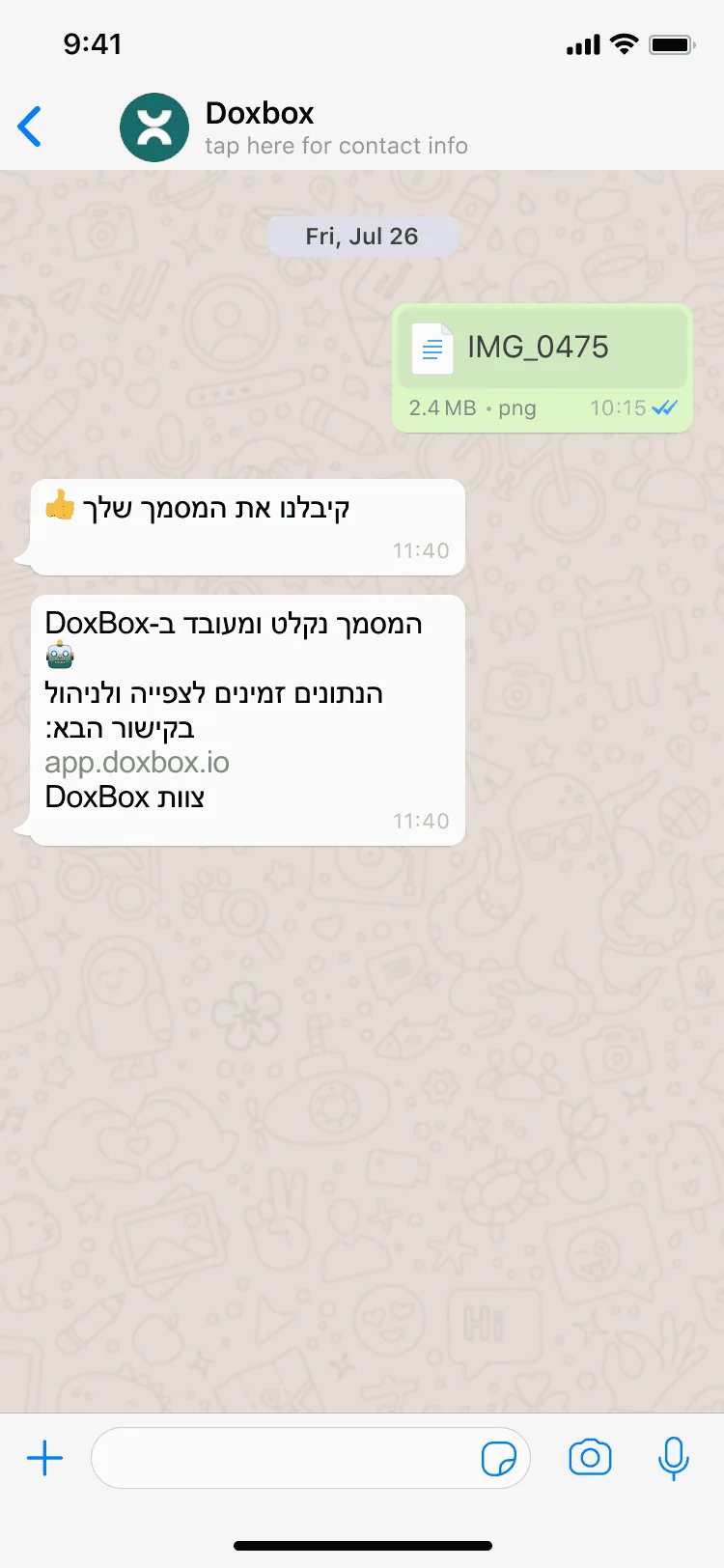
With Doxbox, you simply forward the message or attachment from WhatsApp, and the invoice is instantly saved inside the system.
No downloading files. No renaming. No manual uploads. Just forward and move on.
Automatic saving and organization
Once an invoice is forwarded from WhatsApp, Doxbox automatically stores it in one place and organizes it as part of your business expenses.
You don’t need to sort files, create folders, or remember where things are saved. Every invoice is collected consistently, ready when you need it.
Centralized expense records from WhatsApp
WhatsApp chats aren’t built for bookkeeping. Doxbox turns scattered messages into a clear expense record.
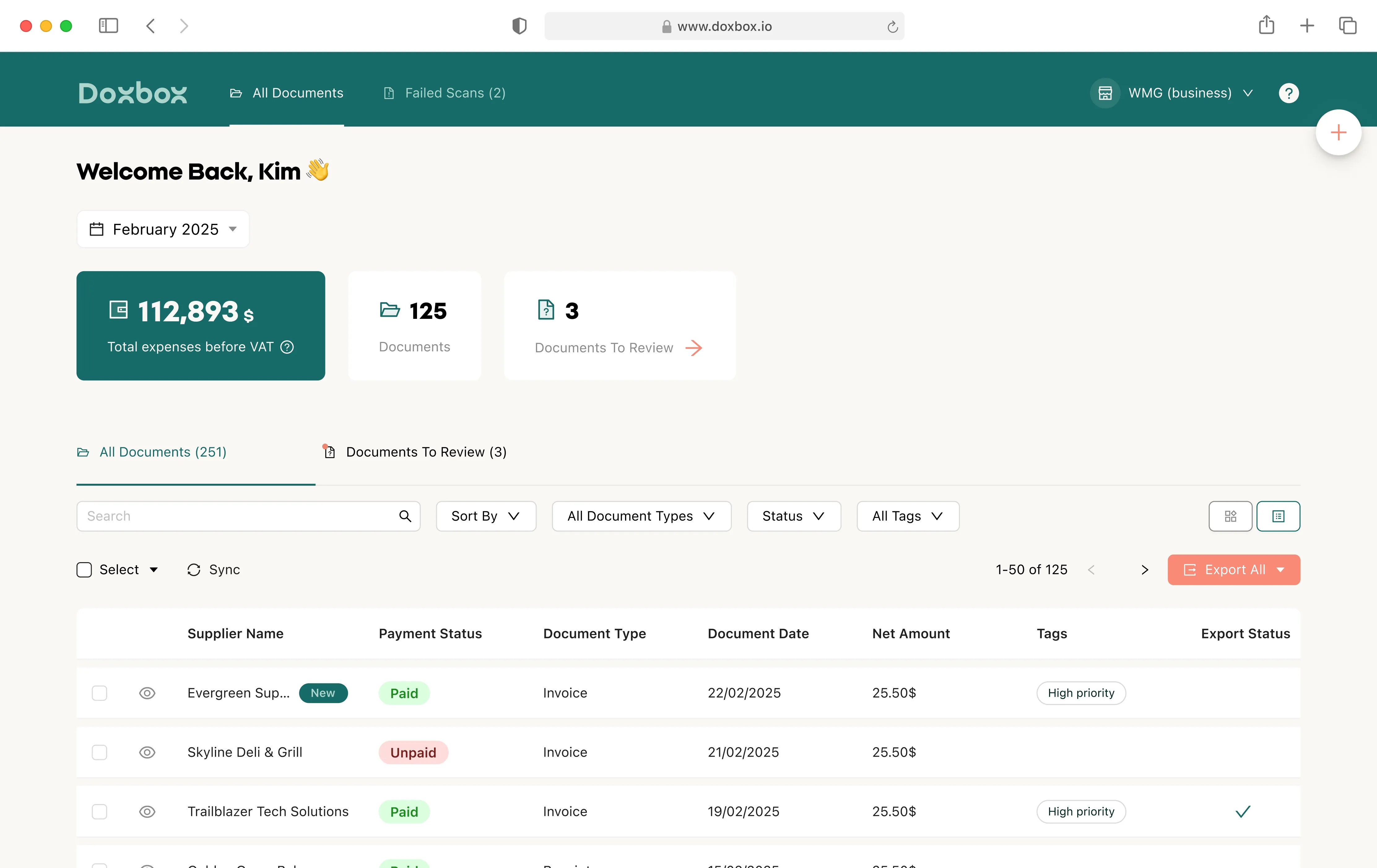
All invoices forwarded from WhatsApp appear inside a centralized dashboard, alongside invoices collected from email or other sources.
One place. One view. No missing documents.
Prepared for accountant review
Invoices collected via WhatsApp are automatically prepared for accountant review.
Instead of searching through chats at the end of the month, everything is already organized inside Doxbox and ready to be shared.
When it’s time export and send in one click.
Mobile-first, built for real life
Doxbox WhatsApp invoice management is designed for how people actually work.
Whether you’re on the go, between meetings, or closing a purchase, you can forward invoices from WhatsApp immediately - without waiting to sit at a desk.
No delays, no forgetting, no backlog.
One system for all invoice sources
WhatsApp is just one input channel.
Doxbox combines invoices received via WhatsApp with invoices collected from email and other sources into a single system.
That means full visibility over your expenses, without juggling platforms or workflows.
Easy start
How WhatsApp invoice management works
Getting started with Doxbox WhatsApp invoice management is simple.
There’s no setup, no integrations, and no new habits to learn.
Step 1: Receive an invoice on WhatsApp
Suppliers, vendors, or service providers send you an invoice or receipt via WhatsApp, just like they already do today.
Nothing changes on their side.
Step 2: Forward the invoice to Doxbox
You forward the message or attachment from WhatsApp to Doxbox.
That’s it - no downloading files, no saving to folders, no manual uploads.
Step 3: Invoice is automatically collected
Once forwarded, the invoice is automatically saved inside Doxbox as part of your expense records.
The system keeps everything organized and accessible, without additional input from you.
Step 4: View everything in one place
All invoices collected from WhatsApp appear in your Doxbox dashboard, together with invoices from email and other sources.
You can see exactly what’s been collected, without searching through chats or devices.
Step 5: Share with Your accountant when ready
At the end of the month or whenever you need everything is already prepared.
Export and share ש invoices with your accountant in one click, without last-minute stress or missing documents.
What we do best
Benefits of using WhatsApp invoice management software
No more lost
invoices
Invoices sent via WhatsApp are easy to forget and hard to track over time.
Using WhatsApp invoice management with Doxbox ensures every invoice you receive is saved immediately and stays accessible.
No more scrolling through chats, no more missing receipts, no more end-of-month surprises.
Save time on manual collection
Manually downloading files, organizing folders, and sending invoices to your accountant takes time you don’t need to spend. Doxbox removes these steps by turning WhatsApp into a simple intake channel for expense invoices.
Forward once everything else is handled automatically.
Less admin,
less stress
Managing expenses shouldn’t feel like a recurring chore.
By collecting invoices directly from WhatsApp, Doxbox reduces the ongoing admin workload and removes the pressure that builds up throughout the month.
Less handling, fewer mistakes, and a much calmer workflow.
Always ready for your accountant
Instead of rushing to gather invoices at the end of the month, everything is already organized. Invoices received via WhatsApp are prepared inside Doxbox and ready to be shared with your accountant when needed.
No last-minute searches. No back-and-forth. Just send and move on.
One clear view of your expenses
WhatsApp chats aren’t designed for financial tracking. Doxbox turns scattered messages into a clear, centralized expense record, giving you visibility over what’s been collected and what’s still missing.
You stay in control, without extra effort.
Who can benefit from WhatsApp invoice management?
Freelancers & small business owners
Invoice management software for freelancers and small business owners receive invoices from many different sources often through WhatsApp.
Doxbox helps keep everything organized without changing how suppliers send documents or how you work day to day.
On-the-go
professionals
Consultants, service providers, and business owners who aren’t always at a desk need a simple way to collect invoices as they arrive.
With Doxbox, forwarding an invoice from WhatsApp takes seconds - no waiting, no reminders later.
Businesses with many
suppliers
When invoices come from multiple vendors, keeping track manually becomes risky.
Doxbox centralizes all WhatsApp invoices in one place, making it easier to stay organized and avoid missing expenses.
Anyone working with an accountant
If you regularly send expense invoices to an accountant, WhatsApp invoice management saves time for both sides.
Everything is already collected and organized, so sharing is simple and efficient.
Start today
Ready to stop chasing invoices?
Turn WhatsApp into a simple way to collect and organize expense invoices. With Doxbox, all your invoices are saved in one place and ready when you need them - without extra work.
Free trial
Setup in under 5 minutes
Cancel anytime
FAQs
Frequently asked questions
How does WhatsApp invoice management work with Doxbox?
How does WhatsApp invoice management work with Doxbox?
DoxBox lets you forward invoices and receipts you receive on WhatsApp directly into the system. Once forwarded, the invoice is automatically saved and organized as part of your business expenses - no downloads, no folders, and no manual uploads.
Do I need to connect or integrate my WhatsApp account?
Do I need to connect or integrate my WhatsApp account?
No. There’s no setup, no integration, and no changes required on your WhatsApp account. You simply forward invoices from WhatsApp to DoxBox, and the system takes care of the rest
Can I collect invoices from WhatsApp and email together?
Can I collect invoices from WhatsApp and email together?
Yes. DoxBox combines invoices received via WhatsApp with invoices collected from email into one centralized system. Everything appears in one place, so you don’t need to manage multiple sources separately.
Is WhatsApp invoice management suitable for small businesses and freelancers?
Is WhatsApp invoice management suitable for small businesses and freelancers?
Absolutely. DoxBox is designed for freelancers and small business owners who receive invoices from many suppliers and want a simple way to stay organized - without changing how invoices are sent or adding extra admin work.
How do I share WhatsApp invoices with my accountant?
How do I share WhatsApp invoices with my accountant?
Invoices collected from WhatsApp are automatically organized inside DoxBox. When you’re ready, you can export and share everything with your accountant in one click - without searching through chats or tracking down missing receipts.